Project write-up
WLED + Home Assistant
Roofline lights I built from 12 V RGB pixels in DIY channel, run by WLED and controlled from Home Assistant, so they follow the sun, the clock, and the calendar.
The problem
The lights ran on WLED by itself, with its own app and timers. That worked, but the lights didn't know anything about the rest of the house, and changing them meant opening a separate app instead of the home dashboard everyone already uses.
Constraints
- Budget: more than $300 for pixels, channel, controller, power supply, and wiring.
- Hardware: a QuinLED controller running WLED, fewer than 300 12 V RGB pixels, and one 12 V power supply.
- Outdoors: everything on the roofline has to survive rain, wind, and sun, and I installed it myself.
- Local only: control had to work on the home network without a cloud account.
- Time: several weeks.
What I built
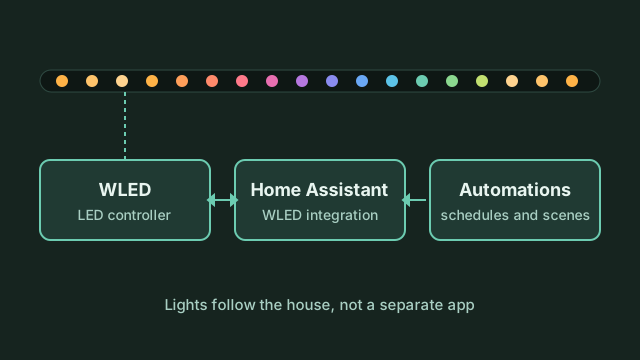
- Mount the channel and pixels. I installed DIY channel along the roofline and set the RGB pixels into it, so the lights sit in a straight, even line instead of hanging on clips.
- Wire power and data. One 12 V supply feeds the run at the controller end, with a second feed from the same supply to the far end of the run. That second feed fixed the color shift described below.
- Configure WLED. The QuinLED controller runs WLED. I set the pixel type and count, then saved holiday presets, so automations can call a preset by name.
- Connect Home Assistant. Home Assistant found the controller on the network and added it through the built-in WLED integration. That exposes on/off, brightness, and presets as entities on the dashboard.
- Write the automations.
- On at sunset.
- Off at a set time each night.
- Holiday presets switch on by date, so the colors change for each holiday without anyone touching them.
How I verified it
- Every pixel: I ran a test pattern across the whole run to find dead or miswired pixels before calling the install done.
- Automations: I watched the sunset and off-time automations run on their own for two to four weeks without me triggering them.
- Power-cut recovery: I cut power and restarted, then checked that WLED and Home Assistant came back and the next automation ran. Both recovered on their own with no manual fix.
What broke / what I'd change
- Color shift at the far end. On a single feed, the pixels at the end of the run were off-color from voltage drop. I fixed it by injecting power at the far end from the same supply.
- Weather and mounting are still open. The roofline install isn't fully weatherproof yet, and I'm still working on it. If I started over, I'd plan sealing and mounting for the outdoors before running the first pixel.
- Holiday switching isn't proven yet. The date-based presets are set up, but I haven't watched one switch on the actual day. That's the next test.